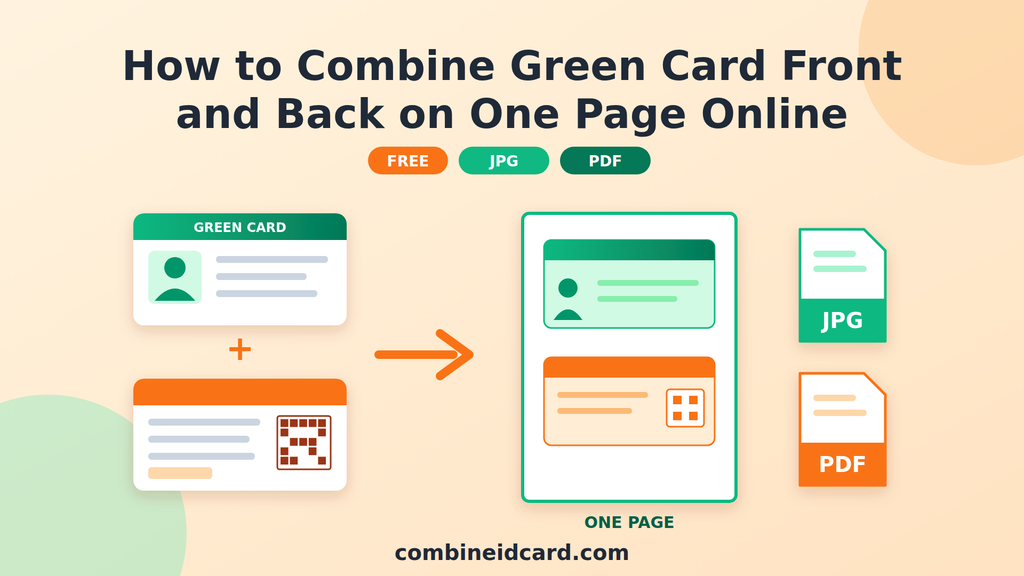
Merge Green Card Front and Back into a single image to keep both sides of your US Permanent Resident Card together for printing, document preparation, or personal records. An online Green Card Image Merger makes it easier to arrange the two sides in one place without using complicated photo-editing software. You can create one clear image instead of handling separate front and back pictures.
A Permanent Resident Card contains important identification and immigration details on both sides. Keeping clear images of each side together can make your digital records easier to organize and access when needed. At interneez.com, you will cover how to combine your Green Card images, adjust their layout, and prepare a convenient JPG or PDF file.
Why Merge Green Card Front and Back into One Image?
If you need to merge Green Card front and back for personal records or a document request, arranging both pictures together can make them easier to manage. A Green Card Image Merger helps organize separate pictures, especially when you need to put both sides of a US Permanent Resident Card on one page for printing or document preparation.
Here are some common reasons to combine Green Card pictures:
- Personal document organization: Keep pictures of both sides together in one file
- Document preparation: Prepare a combined image when an organization specifically requests both sides together
- Printing: Arrange the front and back in one layout for convenient printing
- Digital records: Store both sides together instead of managing separate image files
- Document sharing: Share one combined file when both sides are requested
Best Layout to Merge Green Card Front and Back
Choosing the right arrangement can make your merge Green Card front and back online easier to read and more presentable. A Green Card Image Merger allows you to organize both sides in a single image, with the option to position them vertically or side by side. The best choice depends on your printing preferences and the instructions provided by the organization requesting the document.
Vertical Layout – Front Above, Back Below
The vertical arrangement places the front of your Green Card at the top and the reverse side directly underneath. It creates a portrait-style image that is easy to view and suitable when you want both sides stacked in one file.
This layout works well when:
- You want a clean, top-to-bottom arrangement
- Your document is intended for portrait-size printing
- You prefer both sides displayed in a single column
- You need a simple image for saving or sharing
Horizontal Layout – Both Sides Side by Side
A horizontal arrangement displays the front and back of your US Permanent Resident Card next to each other. This creates a landscape-style image and makes it convenient to compare both sides at a glance.
Consider this layout when:
- You prefer a left-to-right arrangement
- Your page or document has more horizontal space
- You want both sides visible next to each other
- The organization receiving your document accepts a side-by-side image
How to Merge Green Card Front and Back Online?
To merge Green Card front and back online, prepare clear pictures of both sides and upload them to a compatible image-merging tool. An Online Green Card Merger helps arrange separate pictures, while combining both sides of a US Permanent Resident Card into one JPG or PDF file makes document preparation more convenient.
- Prepare both pictures: Save clear photographs or scans of the front and back of your Green Card
- Open the online tool: Visit CombineIDCard.com
- Upload the front image: Select the picture showing the front of your Green Card
- Upload the back image: Add the picture showing the reverse side
- Choose a layout: Select vertical placement to put one side above the other, or horizontal placement to position them side by side
- Adjust image dimensions: Use the available settings to arrange both pictures properly
- Preview the combined image: Check that important details remain visible and readable
- Download your file: Save the completed image in a supported JPG or PDF format
How to Merge US Permanent Resident Card Images Clearly
Preparing a combined Green Card image starts with choosing clear, complete pictures of both sides. To merge Green Card front and back pictures into one image, use the original card images and arrange them carefully so important details remain visible. A US Permanent Resident Card Image Combiner can help bring both sides together in a single, organized file.
Before combining your images, follow these simple guidelines:
- Use matching card images: Make sure both pictures belong to the same Green Card
- Capture the entire card: Keep all four edges visible in each image
- Avoid cropped screenshots: Check that no part of the card is missing
- Maintain image proportions: Avoid stretching or squeezing the original pictures
- Keep details readable: Make sure names, dates, photographs, and printed information are not unnecessarily obscured
- Check image clarity: Use well-lit pictures without excessive blur or glare
- Review before downloading: Inspect the final combined image to confirm that both sides are correctly positioned
How to Resize Green Card Front and Back Images
Sometimes, the front and back Green Card pictures have different dimensions or proportions. When you combine Green Card front and back, adjusting their sizes can help create a balanced result. A Green Card Image Resizer helps arrange both pictures, especially when you need to resize Green Card front and back images without stretching or cropping important details.
Follow these suggestions:
- Maintain the original proportions of both pictures
- Avoid stretching images horizontally or vertically
- Keep both sides visually balanced
- Make sure names, photographs, card details, and other information remain visible
- Use clear original photographs or scans
- Preview the combined image before downloading
Download Your Combined Green Card as JPG or PDF
Once you merge Green Card front and back, select the file format that matches your needs. You can prepare both sides of your US Permanent Resident Card as one image or a document for printing and digital records.
- Choose JPG when an online application accepts image files, or when you need a simple picture to share or store
- Choose PDF when the receiving organization requests a document format or when you prefer a print-ready file for your records
Important: Always check the organization’s file format and size requirements before uploading your combined Green Card. You can use the online Green Card combining tool to arrange both pictures and download a supported format.
Tips for Preparing a Clear Green Card Image for Printing
When you combine Green Card front and back for printing, the quality of your original pictures matters. A merge green card front and back helps arrange both sides, while preparing a readable Permanent Resident Card image for printing on one page requires clear pictures, correct alignment, and suitable dimensions.
Keep these tips in mind:
- Capture both sides in good lighting
- Keep the card straight while taking photographs
- Avoid glare, reflections, and shadows
- Make sure the printed information is readable
- Do not crop important details or card edges
- Maintain the original image proportion
- Check the print preview before printing
Common Problems When Merge Green Card Front and Back Online
An Online Green Card Image Merger can help arrange both sides of your card, but image quality and upload issues may affect the final result. If you experience problems while merging Green Card front and back pictures online, check these points:
- Images won’t upload: Check your internet connection, supported image formats, and browser permissions before selecting the pictures again
- Pictures look stretched: Maintain the original image proportions and avoid changing the width and height independently
- Important details are cropped: Make sure the complete card is visible and check all edges before downloading
- Downloaded image looks blurry: Start with clear, high-quality pictures and avoid enlarging low-resolution images too much
- Final arrangement looks incorrect: Preview the merge Green Card front and back image and confirm that both sides are properly positioned before saving
Is It Safe to Merge Green Card front and back Online?
A Green Card contains sensitive personal and immigration information, so privacy should be a priority when using an online tool. A Secure Green Card Image Merger should clearly explain its image-processing practices, especially when you need to combine Permanent Resident Card pictures while protecting personal identification details.
Before uploading your pictures, consider these precautions:
- Read the website’s privacy policy
- Check whether images are processed in your browser or uploaded to a server
- Avoid uploading sensitive documents to unfamiliar websites
- Do not use public computers for personal immigration documents if possible
- Store downloaded files securely
- Share Green Card copies only when there is a legitimate requirement
Important: Does a Combined Green Card Image Replace the Original Card?
No, Combining Green Card front and back pictures only creates a convenient image or document containing both sides. It does not create an official replacement for your Permanent Resident Card. If your Green Card is lost, stolen, damaged, or needs replacement, follow the official instructions provided by US Citizenship and Immigration Services (USCIS).
Do not rely on a merged image as a substitute for an original card when an official document is required. Always check the requirements of the employer, government agency, financial institution, or other organization requesting your identification.
Final Thoughts on Merge Green Card Front and Back Online
Merge both sides of Green Card into one image can make document preparation, printing, and digital storage more convenient. By using clear pictures, choosing a suitable layout, and checking the final result, you can create an organized file without complicated photo-editing software.
If you need to merge Green Card front and back online, visit CombineIDCard.com. Arrange both pictures, adjust their dimensions, and download your combined file in a supported format.
Frequently Asked Questions
How can I merge Green Card front and back on one page?
Upload clear pictures of both sides to an online ID card merger, choose a vertical or horizontal layout, adjust their dimensions, preview the result, and download the combined file.
Can I merge US Permanent Resident Card images online for free?
You can use an online image-merging tool to arrange both sides together and always check the website for its available features and usage limits.
Can I merge Green Card front and back into single PDF?
Yes, our tool supports PDF downloads, you can save both sides together in one PDF file.
Can I merge Green Card front and back on iPhone or Android phone?
Yes, you can use a compatible online tool through your mobile browser to upload and arrange both pictures.
Can I resize Green Card front and back pictures before merging?
Yes, you can adjust the dimensions using the available resizing options and maintain the original proportions to avoid distortion.
- How to Print ID Card Front and Back on One Page IN 2026 – Free Online Guide
- How to Merge Aadhaar Card Front and Back on One Page Online in 2026 – Free JPG & PDF
- How to Combine ID Card Front and Back on Android and iPhone in 2026 – Free Online Tool
- How to Combine PAN Card Front and Back on One Page Online in 2026 – Free JPG & PDF
- How to Convert ID Card to PDF Online in 2026 – Free JPG to PDF Guide