
Combine ID Card Front and Back Online
Merge Both Sides of Your ID Card on One Page, Resize Images, and Download Print-Ready JPG or PDF Files.
Combine ID Card front and back online with a simple, free tool that helps you merge both sides of your ID card into one page. Use our Merge ID Card online tool to arrange your front and back images vertically or horizontally, adjust card sizes, and download a print-ready JPG or PDF file in seconds.
Whether you need to Combine ID Card online for printing, documentation, or personal records, you can prepare your images directly in your browser without installing software or creating an account. Our tool also works on mobile devices, making it convenient to Combine ID Card on iPhone, Android, or tablet, as well as Windows and Mac computers.
What Does It Mean to Combine ID Card Front and Back?
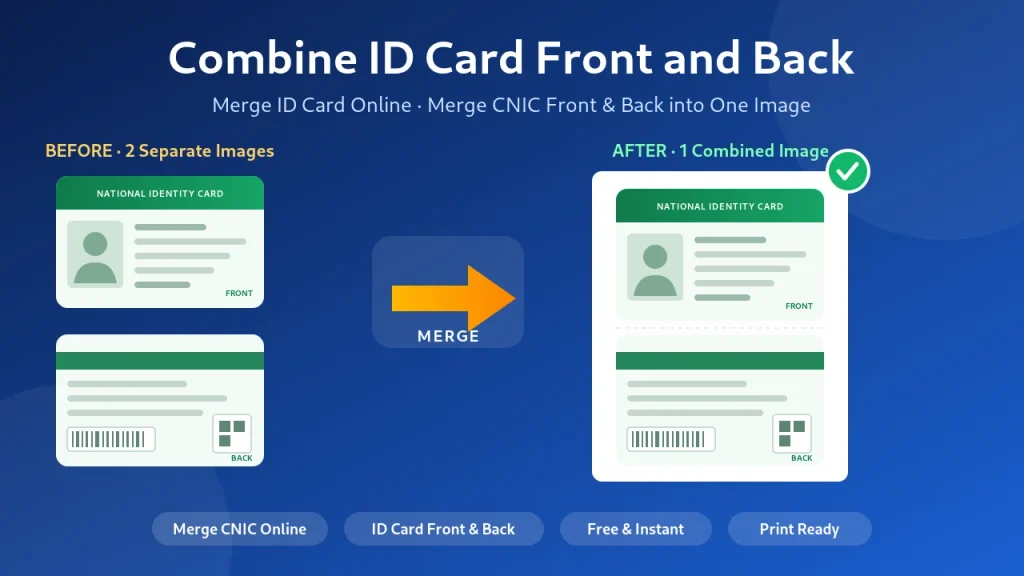
When you Combine ID Card front and back, you bring the front and back images of your ID card together into a single, organized file. Instead of keeping two separate images, you can create an ID card front and back in one page for printing, documentation, or personal record-keeping. With our online tool, you can arrange both sides vertically or horizontally to suit your needs.
People use our Merge ID Card tool for several purposes:
- Combining the front and back of an identity card into one image
- Creating an CNIC card front and back in one page for convenient printing
- Arranging both sides vertically or side by side horizontally
- Resizing card images to create a neat, balanced layout
- Preparing a print-ready ID card for personal records or document submission
- Saving both sides together instead of sharing multiple image files
- Creating a single file that is easier to store, print, or share when required
Our Merge ID Card front and back online tool makes the process simple – just upload the front and back images, choose your preferred layout, adjust the card size if needed, and create one combined image. You can then Download ID card as JPG or PDF, depending on your requirements.
Whether you want to Combine ID Card front and back online for printing or organize your documents, this Online ID card merger helps you prepare both sides in one place without installing additional software. It also works on mobile devices, allowing you to Combine ID Card on iPhone, Android, or tablet, as well as on Windows and Mac computers.
With a straightforward interface and convenient layout options, you can Merge ID card images in just a few steps and create a clean, organized result for your intended use.
How to Combine ID Card Front and Back Online?
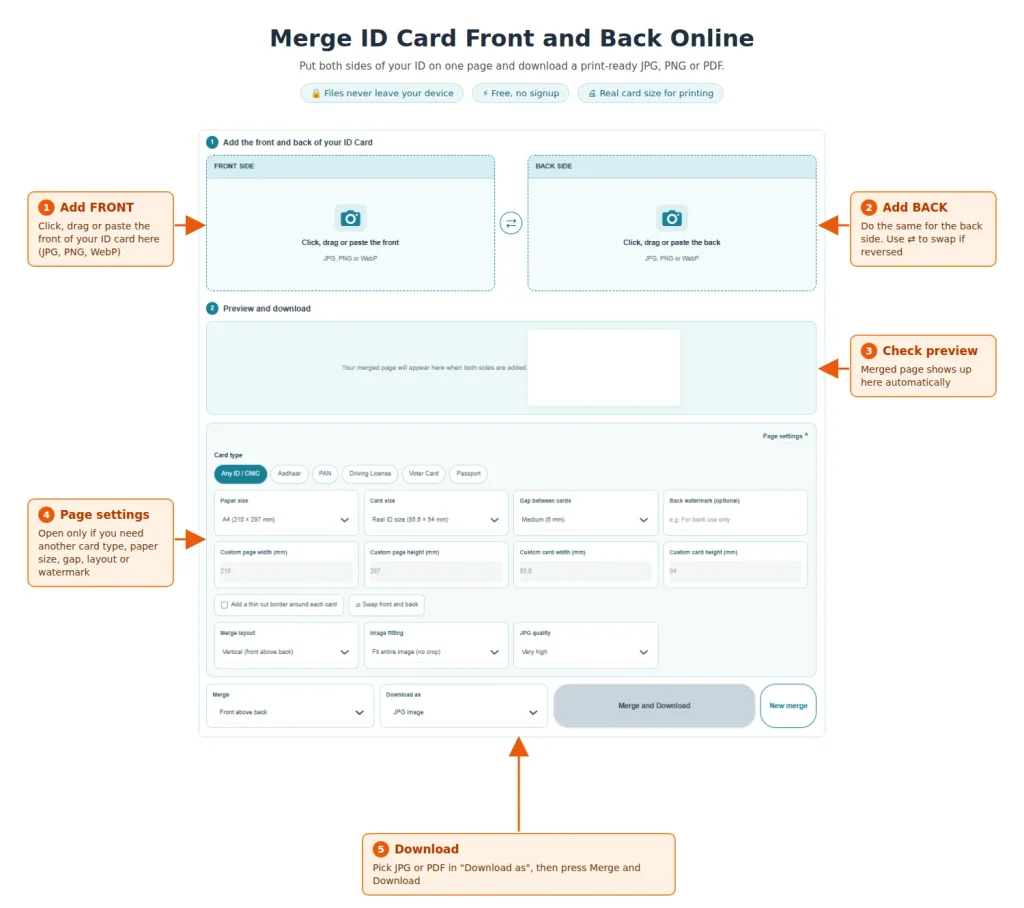
Follow these simple steps to Merge ID Card front and back into one image for printing, saving, or personal records.
1. Upload Your ID Card Images
Click the Upload Images button to add the front and back images of your ID card and select the two images from your device and upload them to the tool. For the best result, use clear images where the text and details on both sides are easy to read.
2. Arrange the ID Card Front and Back
Choose how you want to place both sides of your card. Our Merge ID Card online tool lets you arrange the images according to your preferred layout.
- Vertical Layout: Place the front and back one above the other to combine ID card front and back in one page
- Horizontal Layout: Position both sides next to each other in a single row
- Adjust Card Size: Resize the images as needed to create a balanced layout suitable for printing or saving
These options make it easy to Merge CNIC card images into one organized file.
3. Merge and Download Your ID Card
After arranging the images, click the Merge button to combine CNIC card both sides. Preview the result to check the layout and make sure both images are positioned correctly. When everything looks right, Download ID card as JPG or PDF according to your needs as JPG, JPEG, PNG, WebP, PDF.
The combined file can help you prepare a print-ready ID card for personal documentation or record-keeping. Our Merge ID Card front and back online tool works directly in your browser, so you can Combine ID Card online without installing additional software.
Combine ID Card Front and Back on Any Device
You can Combine ID Card on iPhone, Android, or tablet, as well as on Windows and Mac computers. Open the Online ID card merger in your browser, upload both images, select your layout, and download the combined result.
Why Use Our Tool to Combine ID Card Front and Back?
Our Combine ID Card front and back tool helps you arrange both sides of an ID card into one convenient file for printing or personal records.
Free and Easy to Use
- Combine both sides through a simple interface
- Use the Merge ID Card tool to create one organized image
- Keep your CNIC card front and back online in one page
No Software Installation
- Merge ID Card front and back online in your browser
- Use the Online ID card merger on supported devices
- Combine ID Card on iPhone, Android, or tablet
Flexible Layouts
- Stack both sides vertically or place them horizontally
- Merge ID card images into one composition
- Adjust card size using the available controls
Convenient Downloads
- Preview your combined image before saving
- Download ID card as JPG or PDF, depending on the available options
- Prepare a print-ready ID card for suitable printing needs
Upload your images, choose a layout, preview the result, and Combine CNIC Card online in just a few simple steps.
Who Uses the Combine ID Card Front and Back Tool?
People use our Combine ID Card front and back tool to organize both sides of an ID card into one convenient file.
- Students: Combine student ID card images for personal records
- Office Workers: Keep both sides of an ID card together for documentation
- Businesses: Organize authorized identification records more conveniently
- Everyday Users: Create an CNIC card front and back in one page
- Printing Needs: Prepare a print-ready ID card with a vertical or horizontal layout
- File Sharing: Download ID card as JPG or PDF for suitable uses
- Mobile Users: Combine ID Card on iPhone, Android, or tablet without installing additional software
Which ID Cards Can You Combine?
Our Combine ID Card front and back tool helps you bring both sides of different identification cards into one file, including CNIC, Aadhaar, PAN cards, voter IDs, driving licences, residence permits, student IDs, employee badges, and insurance cards.
- Combine CNIC or national ID card images into one file
- Arrange student IDs and employee badges for personal records
- Place both sides of a driving licence together
- Create an CNIC card front and back in one page for printing or documentation
- Use the available layout settings to Combine CNIC Card online
Add a Watermark to Your Combined ID Card
A watermark can show why an ID copy is being shared and if your tool supports this feature, enter a short message in the Watermark field and preview the result.
- Add a purpose, such as “For account verification only”
- Include a date when needed
- Keep important card details readable
- Review the image before sharing
A watermark does not guarantee protection, so share ID images only with trusted recipients.
JPG, PNG, or PDF: Which Format Should You Choose?
After you Combine ID Card front and back, choose a format that suits your needs.
- JPG: Suitable for websites, online forms, and everyday sharing
- PNG: Useful for preserving image details without lossy compression
- PDF: Convenient for printing and document sharing
Use the available options to Download CNIC card as JPG or PDF, or choose PNG if supported. For a print-ready ID card, check the layout and dimensions before printing.
Is It Safe to Merge an ID Card Online?
ID cards contain sensitive personal information, so check how the Online ID card merger handles your images. Browser-based processing may keep files on your device, but this should be verified through the tool’s actual behavior and privacy policy.
- Use your own ID or documents you have permission to handle
- Avoid public devices when working with sensitive files
- Delete downloaded copies from shared computers
- Share the finished image only with the intended recipient
- Use a watermark when appropriate and available
These precautions help you manage files more carefully when you Merge ID Card front and back online.
Tips for Clear ID Card Images
Clear source images help produce a more readable combined result.
- Use good lighting: Avoid glare and dark shadows
- Keep the camera straight: Prevent distorted card edges
- Capture every corner: Include the entire card in the image
- Match both images: Use similar orientations and dimensions
- Check readability: Make sure text and photos are clear
- Preview before downloading: Confirm the arrangement looks correct
Finally, upload both sides, select your preferred layout, and preview the result before you Combine ID Card front and back and download the finished file.
Frequently Asked Questions
How can I combine ID card front and back online?
Upload the front and back images to the tool, choose a vertical or horizontal layout, preview the result, and download the combined file in a supported format.
Is the Merge ID Card tool free to use?
Yes, our merge ID Card online tool is free to use and you can combine both sides without paying for an image editor.
Which ID cards can I merge with Combine ID Card front and back tool?
You can combine supported identity documents such as CNIC, Aadhaar, PAN cards, voter IDs, driving licences, student IDs, and employee badges. The available layout options may vary by card type.
Can I put my ID card front and back on one page?
Yes, Choose the vertical layout to place both sides one above the other, or use the horizontal layout to position them side by side.
Can I download my combine ID card front and back as JPG or PDF?
Yes, You can download your result in the JPG or PDF formats as Combine ID Card front and back tool supports these formats.
Can I merge ID card images on my mobile phone?
Yes, you can use the tool on a supported mobile browser on an iPhone, Android phone, or tablet.
Can I add a watermark to my combined ID card?
Yes, the watermark feature is available in Combine ID card front and back online tool, enter a short purpose-specific message and preview its placement. Keep the watermark clear without covering important card details.
Is it safe to merge an ID card online?
Yes, our merge ID Card online tool is completely safe to use and all files stay in your browser or are sent to a server before using sensitive documents.
How can I get a clear, print-ready ID card?
Use sharp images with good lighting, capture all four corners, and check that the text is readable. Preview the combined layout and verify the dimensions before printing.
Can I combine ID card front and back without installing software?
Yes, you can combine both sides with our combine ID Card front and back without installing a separate image editor. Open the page, upload your images, choose a layout, and download the result.