Combine NID Card Front and Back Online
Merge both sides of your Bangladeshi NID Card, Paper NID, or Driving License on one page. Preview your images and download them in JPG, PNG, or PDF format for easy printing or sharing.
Need to place both sides of your Bangladesh NID card together? Use our Combine NID Card Online tool to bring the front and back images into one clear layout. Upload your pictures, adjust their position, and preview the result before downloading. No desktop software is needed.
Whether you need to merge NID card front and back for printing or personal records, make sure both sides are clear and correctly aligned. Choose the format that suits your needs and check the final file before sharing. You can also use our Combine ID Card tool to put both sides of other ID cards on one page.
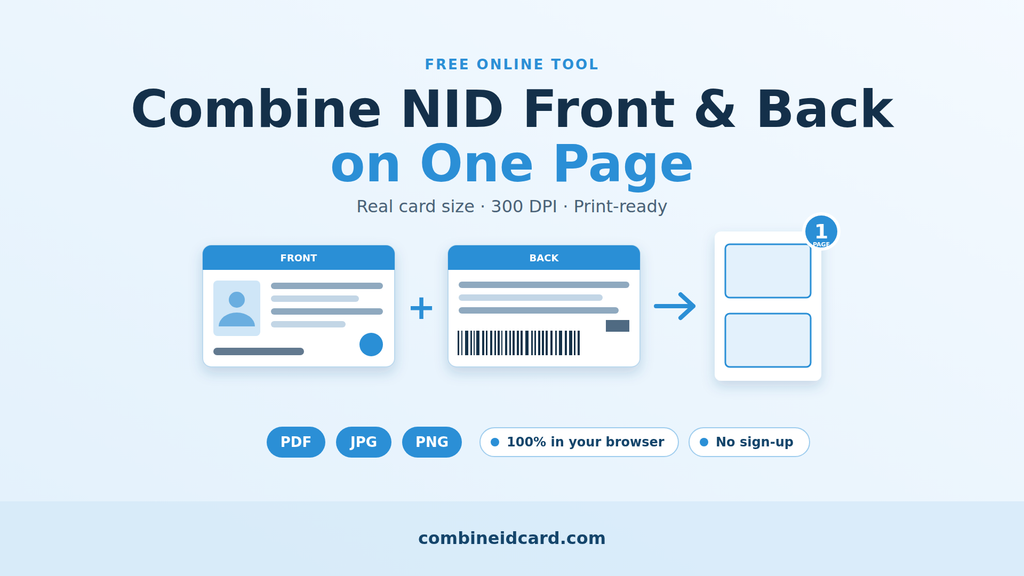
A merge NID Card Online tool helps you place the front and back sides of your National Identity Card in one convenient layout. Instead of keeping two separate image files, you can merge NID card front and back images into a single copy for printing, personal records, or forms that accept this format.
If you need to combine NID card front and back online on one page, upload clear images and check their alignment before downloading. This tool arranges images without changing official NID information. Always use genuine images of your own card and check the receiving organization’s requirements.
How to Combine NID Card Front and Back Online?
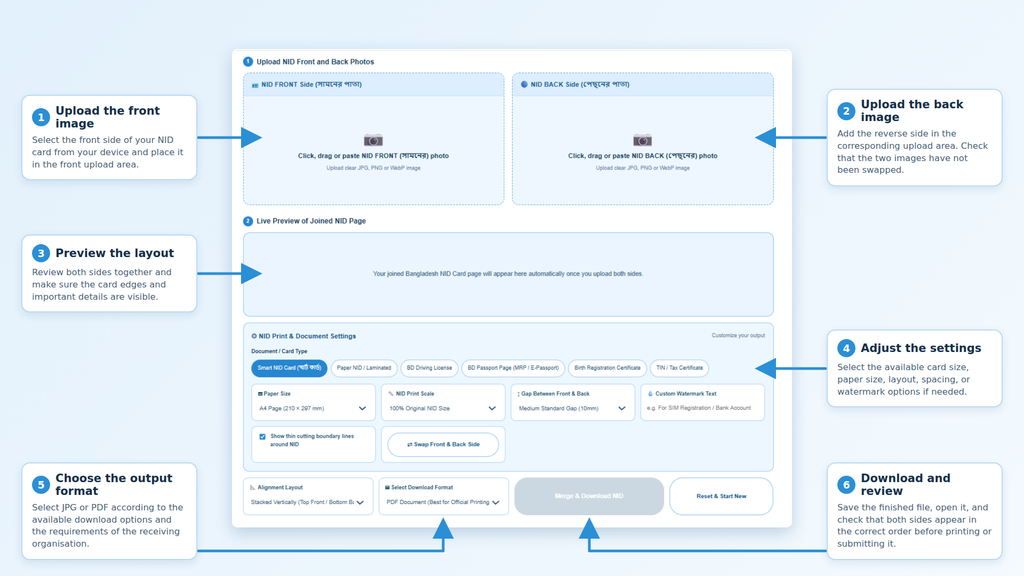
Before submitting the file, open it once to ensure that no card details have been cropped or made difficult to read. Follow these steps to use our NID Card Image Merger:
- Upload the front image: Select a clear picture of the front side of your NID card
- Upload the back image: Add a clear picture of the reverse side
- Adjust the layout: Arrange both images using the available settings to put the NID card front and back on one page
- Check the preview: Make sure both sides are straight, readable, and fully visible
- Download your file: Save the combined result as a NID Card to JPG or NID Card to PDF, depending on the available download options
Why Combine NID Card Front and Back on One Page?
A combine NID Card Online tool helps you keep both sides of your Bangladesh National Identity Card together in a single layout. This can make a document copy easier to view, print, and organize when a recipient accepts a combined image or document.
Whether you have a Smart NID or an older paper-based card, the main purpose of an NID card image merger is to arrange the two sides without changing the information printed on them. If you need to merge NID card front and back online on one page, choose a layout that keeps both sides clear and readable. Always check the recipient’s instructions before sharing or printing the result.
Smart NID vs Old Paper NID: What You Should Know
Bangladesh has Smart NID cards as well as older paper-based or laminated NID cards. Their physical appearance and printed details may differ, but the basic process of arranging front and back images can be similar. The important thing is to preserve the original card details when you Combine NID Card Online.
The following table highlights practical differences to consider when preparing an NID front and back image.
| Point | Smart NID Card | Old Paper or Laminated NID |
|---|---|---|
| Physical appearance | Plastic card with an embedded chip | Paper-based or laminated card |
| Printed information | Check the details on your card | Check the details on your card |
| Photographing the card | Use even lighting and avoid glare | Keep the card flat and avoid edge shadows |
| Image alignment | Keep the card straight and all edges visible | Check for curled corners or uneven edges |
| Preparing both sides | Keep the original proportions | Preserve the original proportions and readable text |
If you are unsure about the number format or card type, refer to your own card or the official Bangladesh NID service. An online NID card front and back joiner is intended to arrange images, not to verify or change official identity information.
Compare Our NID Tool with Other Ways to Combine Images
You can arrange identity card images using different methods, but the most suitable option depends on your device, required output, and the settings available. When using Combine NID Card Online, check which features the tool actually provides before preparing your file.
| Feature | Online NID Combining Tool | Word Processor or Design App | Printer ID Copy Mode |
|---|---|---|---|
| Arrange front and back | Use the available layout settings | Position images manually | Depends on printer support |
| Adjust image size | Depends on tool settings | Usually adjusted manually | May be automatic |
| Use on a phone | Depends on mobile compatibility | Depends on the app | Usually requires printer access |
| Add a watermark | Only if the tool includes this option | May require manual editing | Usually depends on printer features |
| Export options | Check the available download formats | Depends on the application | Often produces a paper copy |
| Account requirements | Depends on the website | Depends on the application | Depends on the device or service |
An NID card front and back merger can be convenient when you want to arrange two images without opening a full design application. To merge both sides of a Bangladesh NID card into one file, select a method that meets your printing or submission requirements. Do not assume that every tool supports automatic sizing, watermarking, or every download format.
Tips for Clear NID Card Images
The final result of merge NID Card Online depends on the quality of the original photographs. Even a well-arranged layout may look unclear if the source images contain glare, shadows, or blurred text.
For a better Bangladesh NID card image, place the card on a flat surface, use even lighting, and keep the camera directly above it. Make sure all four edges are visible and avoid cropping any printed information. If you need to combine NID card front and back images without losing clarity, use clear original photos and review the final preview before downloading.
Avoid heavy compression and unnecessary editing. Resizing an image can change its dimensions, but it cannot restore details that were missing from the original photograph.
JPG or PDF: Which Format Should You Choose?
The best format for your combined NID card depends on how you intend to use the file. When you merge NID Card Online, check the available download options and follow the receiving organization’s requirements.
JPG: Useful when a website or application requests an image file.
PDF: Often convenient for printing or keeping both sides together in a document, provided PDF is accepted.
A combined NID card image may be suitable for some personal records, while a PDF may be more convenient for document handling. If you need to save your NID card front and back on one page as JPG or PDF, confirm that the tool supports your preferred format and that the final file meets any size limits.
Protect Your NID Card Copy After Downloading
Your National Identity Card contains sensitive personal information, so take care when preparing and sharing a copy. Although Combine NID Card Online can help organize the images, it does not replace official identity verification or government NID services.
Use only cards you own or are authorized to handle. Check the website’s privacy information before uploading images, and share the finished file only with a trusted recipient for a legitimate purpose. If you need an NID card copy for an online application, follow the recipient’s instructions about image quality, accepted formats, and any permitted redaction.
After using merge NID Card Online, take a few simple steps to keep your downloaded NID card copy safe.
- Add a purpose-specific watermark: For example, write “For bank account opening only” if appropriate
- Include the date: Add the date alongside the purpose when providing a printed copy, if suitable
- Avoid public sharing: Never post a clear NID card image on social media or in public groups
- Remove local copies: Delete downloaded files from shared computers or printing shop PCs when you finish
- Share carefully: Provide your NID card copy only to trusted people or organizations with a legitimate reason to request it
Frequently Asked Questions
Can I combine both sides of a Bangladesh NID card online?
Yes, you can combine NID Card front and back online, upload the front and back images to a compatible tool, arrange them using the available settings, and check the preview before downloading the result.
Does the tool work with Smart NID and old paper NID cards?
It can work with images of either card type if the uploaded files meet the tool’s requirements and make sure the card edges and printed details are visible.
Can I combine NID card front and back on one page?
Yes, the tool provides a layout that places both sides together and you can also review the final preview to ensure neither side is cropped.
Can I download the combined NID card as JPG or PDF?
Yes, choose from the formats actually offered by the tool and check the receiving organization’s requirements before selecting a download format.
Will combining my NID card change its official information?
The purpose of an image-combining tool is to arrange pictures, not to update official NID records. Use genuine images and preserve the information printed on the card.
Is this an official Bangladesh NID service?
No, This is an independent tool for arranging images for official registration, correction, verification, or other NID services, consult the relevant Bangladesh government service.