Combine Emirates ID Front and Back Online
Bring both sides of your UAE Emirates ID together in one convenient layout. Upload the front and back images, arrange them neatly, and prepare a combined copy for printing, sharing, or keeping your personal documents organized.
Need to Combine Emirates ID Front and Back into one convenient layout? Instead of managing two separate images, bring both sides of your UAE Emirates ID together in a single file that is easier to store, print, or share when required. A neatly arranged copy can also make your personal documents easier to organize.
Whether you are preparing paperwork or keeping a digital copy for future reference, an Emirates ID image combiner can help you arrange both sides together. This UAE ID card merger offers a convenient way to keep the front and back in one place, making your document easier to access whenever you need it.
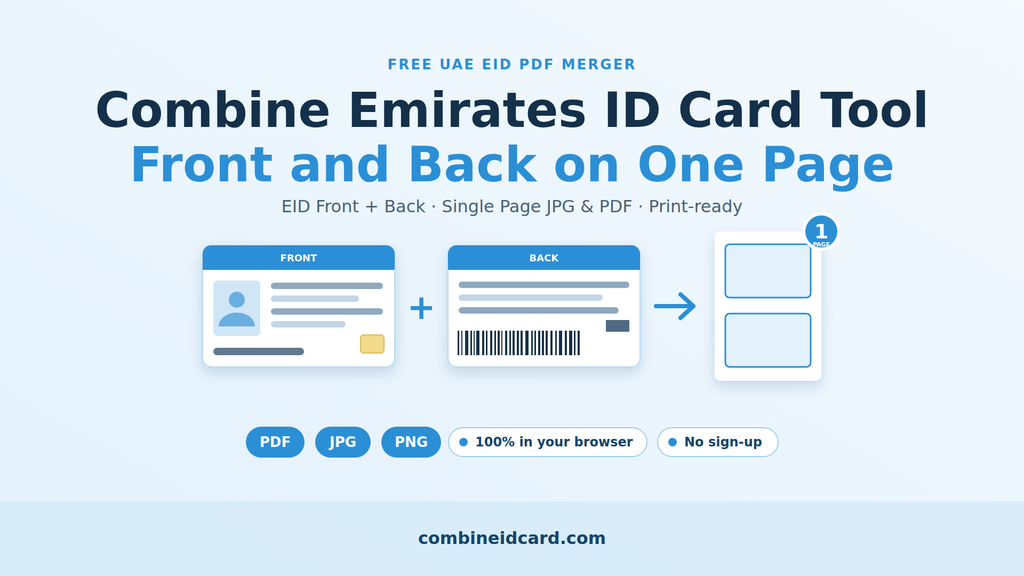
Have you ever needed to adjust an identity document before submitting an application or keeping a copy for your records? Combine Emirates ID Front and Back can be part of preparing your document files, helping you organize the images you may need for different situations. Always check the recipient’s instructions before submitting an edited document.
For everyday document preparation, an Emirates ID image editor can help with supported image adjustments, while a UAE document preparation tool can make common file tasks more convenient. Before sharing your document, check the image dimensions, confirm that the required details are readable, and make sure the saved file meets the requested format.
Why Combine Emirates ID Front and Back?
The front and back of an Emirates ID contain different details, so you may need to refer to both sides when organizing your records or preparing a document copy. Keeping the images together can make it easier to review the information without opening separate files.
Using Combine Emirates ID Front and Back can help you prepare a single reference copy when a combined layout is suitable for your needs. An Emirates ID card merger is useful for arranging both images, while a combine Emirates ID images for document submission workflow can help you prepare files for applications or personal records. This type of document organization is convenient, but always follow the receiving organization’s requirements.
Common Reasons to Combine Emirates ID Images
| Purpose | How a combined copy can help |
|---|---|
| Personal records | Keeps both sides together for easy reference |
| Document preparation | Helps organize images before an application |
| Printing | Makes it easier to arrange both sides in one layout |
| Digital storage | Reduces the need to manage separate image files |
| Sharing when permitted | Provides one convenient file to send to an intended recipient |
Tip: Some organizations require the front and back as separate files or ask for an unedited document. Check their instructions before submitting a combined image.
How to Combine Emirates ID Front and Back Online?
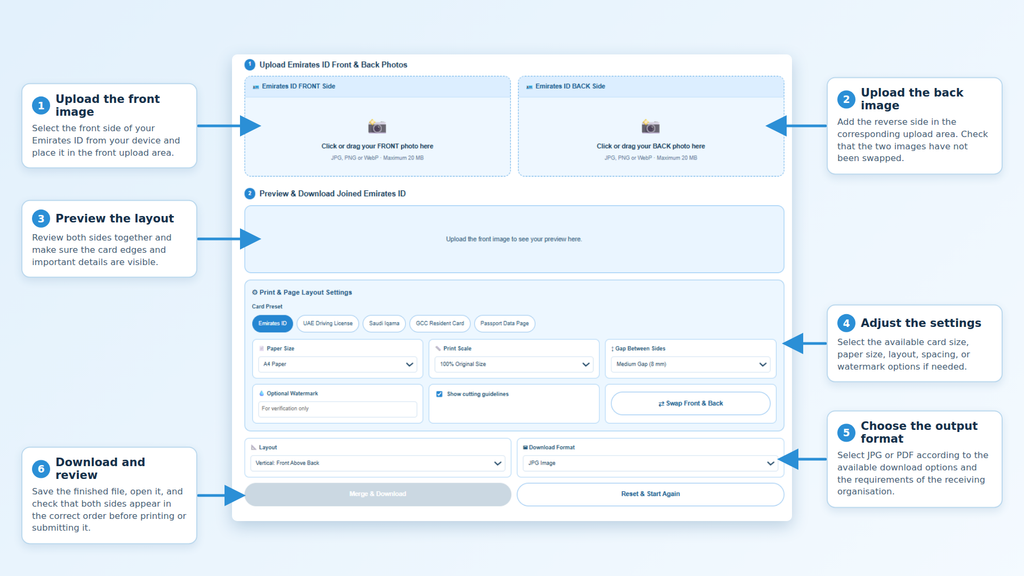
Preparing both sides of your Emirates ID in one layout can be straightforward when you have clear images and know how you want them arranged. Before starting, make sure the front and back photos show the complete card and that the important details are easy to read.
To Combine Emirates ID Front and Back, upload both images to the tool and choose a suitable arrangement from the available options. An Emirates ID image combiner can help you organize the two sides, while how to merge UAE Emirates ID front and back into one image is a useful approach when preparing a single reference copy. The goal is to create a neat result without distorting the original images.
Steps to Combine Both Sides of Your Emirates ID
- Prepare your images: Select clear pictures of the front and back of your Emirates ID.
- Upload the front image: Choose the image showing the front of the card.
- Upload the back image: Add the second image to include the reverse side.
- Choose a layout: Select a vertical or horizontal arrangement if the tool supports these options.
- Review the preview: Check that both sides are complete, aligned, and readable.
- Download the result: Save the combined file in one of the formats available in the tool.
How to Choose the Right Layout for Combine Emirates ID Front and Back
The right image layout depends on how you plan to use your Emirates ID copy. A vertical arrangement can fit documents that follow a top-to-bottom format, while a horizontal layout may be more convenient when you want to view both sides next to each other. The important thing is to keep the information clear and avoid cutting off the card edges.
When using Combine Emirates ID Front and Back, choose a layout that suits your intended purpose and the options available in the tool. An Emirates ID layout organizer can help arrange both images, while placing UAE Emirates ID front and back on one page may be useful when preparing a printable reference copy. Proper image alignment helps maintain a neat result without stretching the original card proportions.
Which Emirates ID Layout Should You Choose?
| Layout | Suitable for | What to check |
|---|---|---|
| Vertical | Top-to-bottom document layouts | Both sides fit within the available page space |
| Horizontal | Side-by-side viewing | The combined image is not too wide |
| Print-ready page | Preparing a copy for printing | Page size and margins are suitable |
| Original proportions | Keeping the card appearance natural | Neither image is stretched or distorted |
Before downloading, review the complete image and confirm that both sides are readable. If an organization specifies a particular format or arrangement, follow those instructions instead.
How to Keep Your Combined Emirates ID Image Clear
A clear image makes it easier to read the information printed on your Emirates ID. Poor lighting, glare, blurry photos, or cropped edges can make important details difficult to see. Starting with good-quality images helps you prepare a more useful copy for your records.
When you Combine Emirates ID Front and Back, check the result for clarity before saving it. An Emirates ID image quality tool may help with supported image adjustments, while combining Emirates ID photos without losing text clarity depends on using clear original images and avoiding excessive resizing or compression. Careful image quality control helps keep the final result readable.
Common Image Problems and How to Avoid Them
| Problem | Possible cause | Recommended action |
|---|---|---|
| Blurry text | Original photo is out of focus | Take a clearer photo |
| Glare on the card | Strong light or camera flash | Use even lighting |
| Cut-off edges | Image was cropped too tightly | Include the entire card |
| Stretched appearance | Width and height changed unevenly | Preserve the original proportions |
| File looks pixelated | Image was enlarged too much | Start with a higher-quality image |
| Details are difficult to read | Excessive compression | Use a suitable image quality setting |
Before You Save the Final Image
- Check that both sides are fully visible.
- Make sure the text and numbers remain readable.
- Avoid unnecessary cropping or stretching.
- Review the downloaded file, not just the preview.
- Follow any image quality requirements provided by the recipient.
Remember: Combining two images does not automatically improve their quality. If either side is unclear, use a better original image before preparing the final copy.
Make Combining Your Emirates ID Front and Back Easy
Keeping identity documents organized can make everyday paperwork less complicated. Whether you are preparing a personal record or arranging images before printing, clear files and a suitable layout can help you manage your documents more conveniently.
Combine Emirates ID Front and Back to keep both sides together when a single layout suits your needs. An Emirates ID image merger can simplify image arrangement, while combining UAE Emirates ID images for printing and digital records can help you keep related files organized. Always review the final image, protect your personal information, and follow the recipient’s requirements before submitting or sharing your document.
Frequently Asked Questions
How Can I Combine Emirates ID Front and Back Online?
It is too easy to combine emirates id front and back – upload clear images of both sides to an image-merging tool, choose a suitable layout, and review the preview. Download the combined file using one of the formats supported by the tool.
Can I combine Emirates ID front and back online on One Page?
Yes, our tool supports a combined layout and you can arrange the front and back vertically or horizontally, depending on the available options and your intended use.
Can I Combine Emirates ID front and back Images on My Mobile Phone?
Yes, our tool is compatible with mobile browser and you can easily combine emirates id front and back online. Select both images, arrange them as needed, and save the result if the tool supports downloads on your device.
Can I Download a Combined Emirates ID as JPG or PDF?
Yes, the tool provide download options with multiple formats and check whether JPG and PDF formats are supported before starting, and choose the format requested by the recipient.
How Can I Make Sure Both Sides of My Emirates ID Are Clear?
Use well-lit, focused images and include the complete card edges and review the final image at full size to ensure the text and important details remain readable.
Can I Combine Emirates ID front and back Without Installing Software?
Yes, if you use a browser-based tool that supports image merging. Check its upload options, available layouts, and download features before using it.
Is It Safe to Combine Emirates ID front and back Online?
Safety to combine emirates id front and back depends on tool website file handling practices. Use a trusted service, review its privacy policy, and avoid uploading sensitive identity documents to websites you do not trust.