
Add Watermark to ID Card Online
Add a custom watermark to your ID card image in seconds, with simple text and placement options to label your copy for sharing or personal records.
Need to label an ID card copy before sharing it or keeping it for your records? Add Watermark to ID Card Online to place a custom text watermark on your image and make its intended use clear. Whether you need to mark a copy for personal records or a specific purpose, a visible label can help distinguish it from the original.
Our ID Card Watermark Tool makes it easy to add text to an ID card image without complicated editing software. You can create a custom text watermark, adjust its placement, and preview the result before downloading. If you need to prepare your card image first, visit our homepage to explore other useful ID card tools.
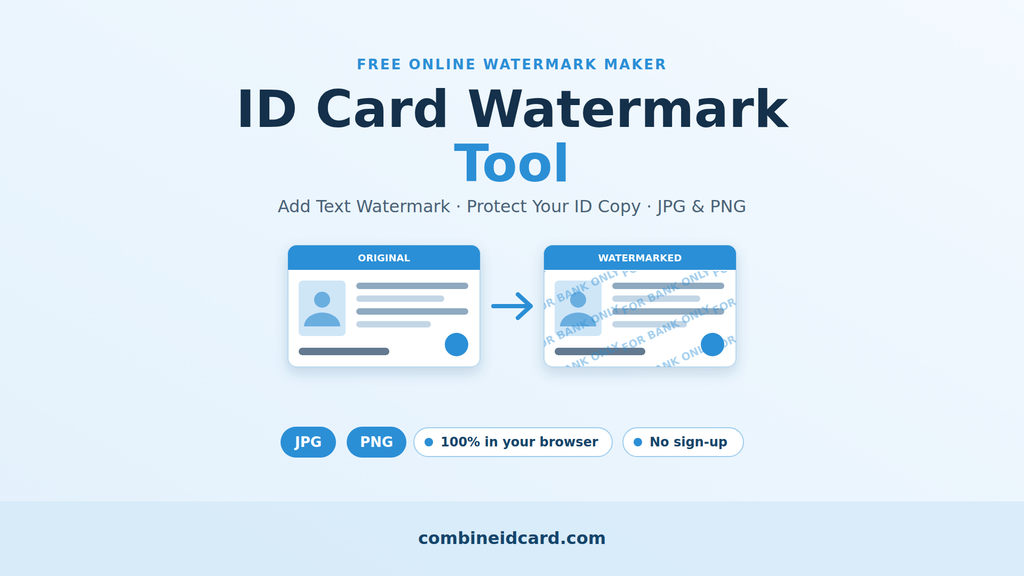
Preparing identity documents for an application, printing, or everyday use often means adjusting images, improving readability, or converting files into the right format. Our ID card image tools help with everyday tasks, including resizing card images, reducing file size, and converting pictures to PDF. If you need to resize an ID card image online or hide sensitive details before sharing a copy, these tools make document preparation more convenient without requiring complicated editing software.
If you need a simple way to prepare your identity document, Add Watermark to ID Card Online and explore other useful tools available on our website. You can label a copy for a particular purpose, organize your document images, and choose the tools that suit your needs. Whether you are working with a CNIC, driving licence, passport, or another identity document, the aim is to make everyday document preparation easier without complicated software.
What Does It Mean to Add Watermark to ID Card Online?
What does it mean to add a watermark to an ID card, and when might you need one? Watermark to ID Card Online means placing a visible text label over an image of an identity document to show why the copy was prepared. For example, you might label a copy for a particular application or for your personal records. A watermark helps communicate the intended use, but it does not make the document official or guarantee protection against misuse.
An ID card watermark tool makes it easier to add a clear label without editing the image manually. You can use a short phrase that explains the purpose of the copy while keeping important details, such as the photograph and card number, readable. A custom Add Watermark to ID Card Online should be easy to understand and placed carefully so it does not interfere with the information someone needs to check.
Why Add Watermark to ID Card Copy?
Why might you want to label an identity document before sharing it? Add Watermark to ID Card Online when you want the purpose of a copy to be clear to the person receiving it. A short label can help distinguish a copy prepared for one request from an image kept for another purpose. For example, you may need to provide an ID card image for a rental application or another specific requirement.
A watermark for identity documents can be useful for keeping copies clearly labelled, especially when you prepare them for different purposes. If you need to label an ID card copy for a specific purpose, choose wording that matches the intended use and follow the recipient’s instructions. Keep the watermark readable without covering essential details, and remember that some organizations may require an unmarked copy.
How to Add Watermark to an ID Card Online?
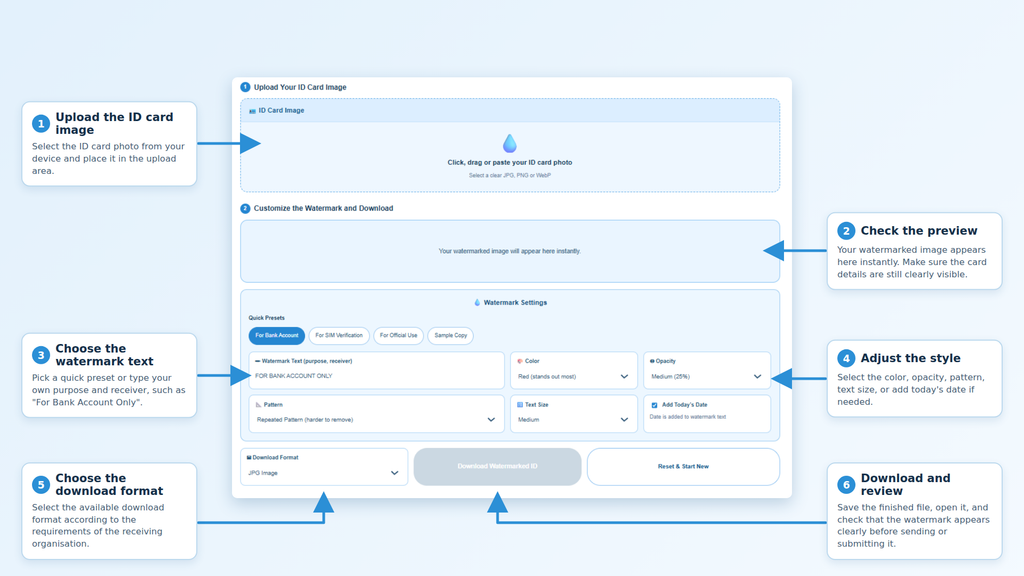
Using an ID card watermark tool is simple. Follow these steps to add a custom text watermark to an ID card online and prepare a clearly labelled copy.
- Upload your image: Select a clear image of the ID card copy you want to mark
- Enter your watermark text: Type a short purpose statement or custom label that explains how the copy will be used
- Adjust the appearance: Change the watermark’s position, size, or transparency if these options are available
- Preview the result: Make sure the watermark is easy to see without covering important card details
- Download the image: Save your watermarked ID card copy in the format supported by the tool
What Should You Write on an ID Card Watermark?
The best watermark wording depends on why you need to share the copy. A short, clear label is usually easier to understand than a long message. Before you Add Watermark to ID Card, check whether the organization receiving it accepts watermarked documents.
Examples of suitable watermark text include:
- “For Bank Account Opening Only”
- “For Rental Application Only”
- “For Office Records Only”
- “For Address Verification Only”
- “Copy for Personal Records”
A custom ID card watermark should explain the intended use without suggesting official approval that has not been granted. If you need to write a purpose-specific watermark on an ID card copy, choose wording that matches the actual reason for sharing it and avoid adding unnecessary personal information.
Choose the Right Watermark Position and Appearance
A watermark should be easy to notice without making the ID card difficult to read. When using an Add Watermark to ID Card Online, consider how the text looks against the image and whether important details remain visible.
| Setting | What to consider |
|---|---|
| Position | Place the watermark away from essential text and identification details where possible. |
| Text size | Keep the label readable without letting it dominate the image. |
| Transparency | If supported, choose a level that keeps both the watermark and card details visible. |
| Angle | A diagonal watermark can stand out, but it should not obstruct important information. |
| Colour | Choose a contrasting colour that remains readable against the card background. |
To place a readable watermark on an ID card image, preview the result at full size before downloading. Text that looks clear in a small preview may cover important details when the image is enlarged or printed.
Can You Watermark Different Types of ID Cards?
Depending on the image formats supported by the tool, you may be able to Add Watermark to ID Card Online and other several types of identity documents. These can include CNICs, Aadhaar cards, PAN cards, voter IDs, driving licences, employee IDs, and student cards.
An ID card watermark tool online adds a visible mark to an image; it does not verify the document or change official records. If you want to watermark a CNIC, Aadhaar, or Voter ID image, check that the file is supported and keep the watermark clear of details required by the receiving organization.
Common Problems When Adding an ID Card Watermark
If your watermark does not look right, review its wording, placement, and visibility before downloading the image again.
| Problem | What you can try |
|---|---|
| Watermark covers important details | Move it to a less obstructive position. |
| Text is difficult to read | Adjust the size or colour if the tool allows it. |
| Watermark is too faint | Increase its visibility using the available settings. |
| Original card looks blurry | Start with a clearer source image. |
| Download does not open | Try downloading again and check the file format. |
| File is not accepted by a website | Confirm the required format and size with the recipient. |
A custom watermark for an ID card image should remain visible while allowing the underlying details to be read. Before you save a watermarked ID card for submission, confirm that the recipient accepts marked copies.
Add a Clear, Purpose-Specific Watermark to Your ID Card
A short watermark can help explain why a document copy was prepared and make its intended use clearer. Use Add Watermark to ID Card to label your image, review the result, and download the file if it meets your needs. Before sharing it, check that the watermark does not obscure important details and that the recipient accepts a marked copy.
Use the online watermark tool to label your document copies clearly and conveniently and always review the final image before sharing it with others.
Frequently Asked Questions
How can I add watermark to an ID card online?
You can add a watermark by uploading your ID card image, entering a short label, and adjusting its appearance using the available settings. Preview the result to make sure important details remain readable, then download the watermarked image in a supported format.
What should I write on an ID card watermark?
Choose a short phrase that explains why the copy is being shared. Examples include “For Rental Application Only,” “For Office Records Only,” or “For Personal Records.” A custom ID card watermark should reflect the actual purpose and follow the recipient’s instructions.
Can I add custom text to my ID card image?
Yes, the tool supports text watermarks, you can add a custom label to your image. When you add watermark to ID card online, keep the wording brief and position it so the photograph, card number, and other necessary details remain visible.
Can I watermark a CNIC, driving licence, or voter ID?
Yes, You can Add Watermark to ID Card Online and other document images if their file formats are supported by the tool. An ID card watermark tool online adds a visible label to an image but does not verify the document or change its official status. Check the receiving organization’s requirements before submitting a marked copy.
Does adding a watermark protect my ID card from misuse?
A watermark can communicate the intended purpose of a copy, but it cannot guarantee protection against copying, editing, or misuse. Share identity documents only through trusted channels and avoid uploading sensitive images to services whose privacy practices you do not understand.
Will add watermark to ID Card online affect the readability of ID card?
No, Add Watermark to ID Card Online does not affect readability, use a suitable size and position, and check the finished image at full resolution. If the recipient needs to read every detail, make sure the watermark does not interfere with that requirement.
Can I submit a watermarked ID card for official purposes?
Requirements vary by organization and application. Some recipients may accept a purpose-labelled copy, while others may require an unmodified image. Always check the submission instructions before using a watermarked ID card copy for banking, verification, employment, or other official purposes.