
ID Card Resizer Online
Resize your ID card images to suitable dimensions for printing, uploading, or keeping digital copies organized. Adjust image size while maintaining the original card proportions.
Need to adjust an ID card image for a form, printout, or digital record? An ID Card Resizer helps you change image dimensions to suit your needs without unnecessarily complicating the process. Whether you are organizing a personal document or preparing an image for an upload, choosing suitable dimensions can make the final file easier to use.
Different situations may require different image sizes, so it helps to understand the available resizing options before making changes. An ID card image resizer can help you prepare a suitable copy, while learning how to resize an ID card image without stretching it can help preserve the card’s original proportions. For more useful image and document tools, visit our CombineIDCard homepage and explore the options available for preparing identity documents.
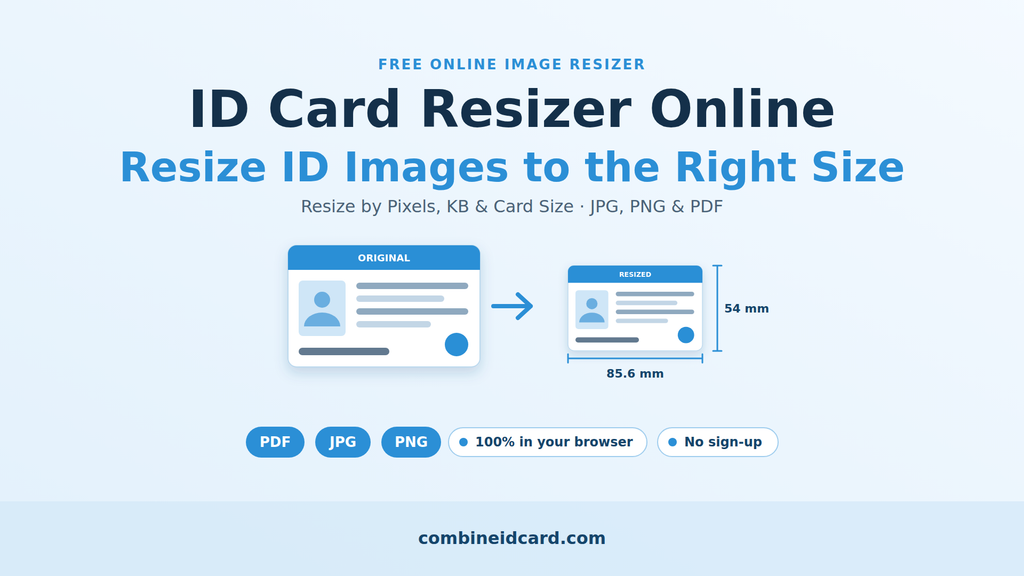
An ID card image may need resizing when its dimensions do not match the requirements of an online form, document upload, or print layout. Changing the image size can help you prepare a more suitable file while keeping the card’s important details visible.
An ID Card Resizer helps adjust image dimensions according to your needs. A digital ID card resizing tool can be useful when you want to resize an ID card image to specific dimensions without stretching or distorting it. For the best result, use a clear original image and check that the text, photograph, and card edges remain visible after resizing.
Why Do You Need to Resize an ID Card Image?
An ID card image may need different dimensions depending on where you plan to use it. An online application might specify image width and height, while printing may require a particular size or page layout. Adjusting the dimensions can help you prepare a file that fits the intended purpose without making the card unnecessarily large or small.
An ID Card Resizer can make this process more convenient by helping you adjust image dimensions for different uses. A digital ID image resizing tool is useful when you need to resize an ID card photo to the required dimensions for an online form or printing. Proper image size adjustment can also help maintain a neat appearance, provided the original proportions are preserved.
Common Reasons to Resize an ID Card
| Purpose | Why resizing may help |
|---|---|
| Online applications | Match the image dimensions requested by a form |
| Printing | Prepare the image for a suitable print layout |
| Digital records | Keep ID card images organized at convenient dimensions |
| File preparation | Adjust image dimensions before uploading or sharing |
| Document layouts | Fit an ID card image into a larger document |
Before You Resize
- Check the required width and height, if specified
- Keep the full card visible rather than cutting off its edges
- Preserve the original aspect ratio to avoid distortion
- Review the resized image to make sure important text remains readable
- Follow the receiving organization’s image requirements when submitting documents
How to Use an ID Card Resizer Online?
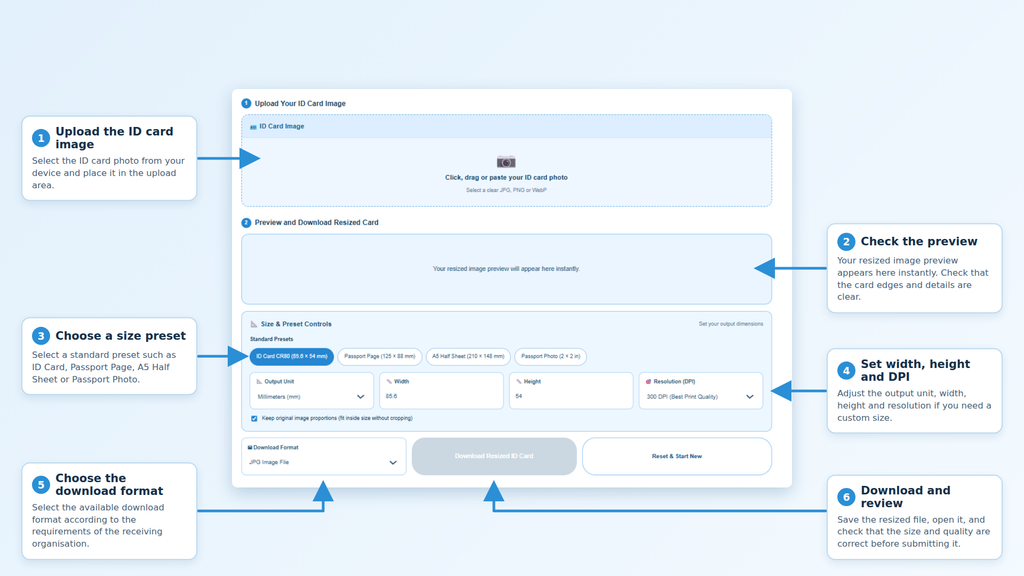
Getting an ID card image ready for an application or printout does not have to be complicated. Start with a clear image and check whether the receiving website or document requires specific dimensions. This helps you choose the right size before making any changes.
An ID Card Resizer can help you adjust an image to suit your intended use. A free online ID image resizer makes the process convenient when you need to resize an ID card image online to custom width and height dimensions. The available options depend on the tool, but the aim is to prepare an image that fits the required size without unnecessary distortion.
Steps to Resize an ID Card Image
- Choose your image: Select a clear photo or scan of your ID card
- Upload the image: Open the resizer and upload your selected file
- Enter the dimensions: If supported, specify the required width and height
- Maintain proportions: Keep the original aspect ratio where possible to prevent stretching
- Preview the result: Check that the card edges, photograph, and text remain visible
- Download the resized image: Save the finished file in an available format
Tips for a Better Result
- Check the required dimensions before resizing
- Use a clear, well-lit original image
- Avoid cropping important information from the card
- Do not stretch the image to force it into an unsuitable shape
- Review the downloaded file before uploading it to a form
Important: Resizing changes an image’s dimensions, but it does not guarantee that the image meets every organization’s requirements. Always follow the specific instructions provided by the recipient.
How to Choose the Right ID Card Resizer Settings
Choosing suitable dimensions depends on where you plan to use your image. Some online forms specify exact pixel measurements, while printed documents may require physical dimensions such as millimetres or inches. Checking these requirements first can help you avoid resizing the same image multiple times.
An ID Card Resizer with suitable dimension controls can help you prepare an image for your intended purpose. A custom ID card image resizer is useful when you need to resize an ID card image to specific pixel dimensions without stretching it. Keeping the original aspect ratio and checking the output quality are important parts of proper image dimension control.
Common ID Card Resizer Settings
| Setting | What it means | When to use it |
|---|---|---|
| Width | The horizontal dimension of the image | When a form specifies image width |
| Height | The vertical dimension of the image | When a required height is provided |
| Aspect ratio | The relationship between width and height | To help prevent stretching |
| Output format | The file type used to save the image | When a website requests JPG or PNG |
| File size | How much storage the image uses | When an upload has a size limit |
Before Applying Your ID Card Resizer Settings
- Check the exact dimensions requested by the recipient
- Keep the original proportions whenever possible
- Avoid enlarging a low-resolution image excessively
- Make sure all card edges and necessary details remain visible
- Confirm the downloaded file meets the required format and size limits
Remember: The correct settings depend on your purpose. Not every form accepts the same image dimensions, so follow its instructions rather than relying on a universal ID card size.
How to Maintain Image Quality with an ID Card Resizer
A resized ID card image should remain clear enough for its intended purpose. If the original photo is blurry, poorly lit, or too small, changing its dimensions will not restore missing details. Starting with a clear image and choosing suitable settings can help you avoid an unnecessarily poor result.
An ID Card Resizer can adjust image dimensions, but the final quality also depends on the original file and the resizing method. A high-quality ID card image resizer can be helpful when you need to resize an ID card image without losing text clarity, while proper image resolution management helps you avoid excessive enlargement or compression.
Common ID Card Resizing Problems and Solutions
| Problem | Possible reason | What you can do |
|---|---|---|
| Blurry text | Original image has low resolution | Start with a clearer image |
| Stretched card | Width and height were changed disproportionately | Preserve the original aspect ratio |
| Cut-off edges | Image was cropped too tightly | Keep the entire card visible |
| Large file size | Image dimensions or quality settings are too high | Use a suitable compression option if available |
| Pixelated details | Small image was enlarged too much | Use a higher-resolution original |
| Unclear printed result | Image resolution is unsuitable for the intended output | Check print requirements before resizing |
Tips for Keeping Your ID Card Image Clear
- Use a sharp photograph or scan of the original card
- Keep the card’s original proportions whenever possible
- Avoid enlarging small images excessively
- Check the final image at full size before downloading
- Use compression carefully so important details remain readable
Remember: Resizing changes image dimensions, not the underlying detail captured in the original photo. Always review the final result before using it for printing or document submission.
Make ID Card Resizing Simple and Convenient
Getting an ID card image ready for an online form, printed document, or digital record is easier when you know the required dimensions. Start with a clear original image, choose suitable settings, and review the result before using it.
An ID Card Resizer helps you adjust image dimensions to suit different needs. Whether you are preparing a document for upload or organizing a digital copy, a digital ID image resizing tool can help you resize an ID card image to the required dimensions while preserving its original proportions. Careful image preparation also helps keep important details visible.
Before submitting your resized image, check the recipient’s requirements and make sure the final file is clear, correctly sized, and saved in an accepted format.
Frequently Asked Questions About ID Card Resizer
What Is an ID Card Resizer?
An ID Card Resizer is an online tool or application that changes the dimensions of an ID card image. It can help prepare images for printing, digital storage, or online forms that require specific sizes.
How Can I Resize an ID Card Image Online?
Upload your image to an online resizing tool, enter the required dimensions if supported, and check the preview. Download the resized image after confirming that the card edges and important details remain visible.
Can I Resize an ID Card Image to Custom Dimensions?
Yes, if your chosen tool supports custom width and height settings. Check the dimensions required by the receiving website or organization before resizing your image.
How Do I Resize an ID Card Without Stretching It?
Keep the original aspect ratio whenever possible. This maintains the relationship between the image’s width and height, helping prevent the card from looking stretched or compressed.
Does Resizing an ID Card Reduce Image Quality?
Resizing does not always reduce quality, but enlarging a small image or applying excessive compression can make details less clear. Use a high-quality original and review the result before downloading.
Can I Resize an ID Card on My Mobile Phone?
Yes, you can use a mobile browser or compatible image-editing application. Upload the image, adjust the dimensions using the available settings, and save the result to your device.
What Is the Best Size for an ID Card Image?
The best size depends on how the image will be used. Online forms may specify pixel dimensions, while printing requirements may use millimetres or inches. Follow the recipient’s instructions rather than assuming one size works everywhere.
Can I Reduce the File Size of an ID Card Image?
Some tools offer compression alongside resizing. Reducing dimensions or adjusting image quality may decrease the file size, but excessive compression can make important details difficult to read.