
Combine Iqama Card Front and Back Online
Combine the front and back of your Saudi Iqama or Muqeem Resident ID into one clear image, ready for printing, document submission, or personal records.
Need to keep both sides of your Saudi residence permit together for printing or document submission? Combine Iqama Card Front and Back online to arrange the front and back images in one clear layout. You can review the combined image before downloading it, making it easier to prepare your Iqama copy for the intended purpose.
A Saudi Iqama card merger helps bring both sides together, while an Iqama front and back image combiner makes it easier to keep your document organized in a single file. Use clear images, check that important details remain readable, and choose a suitable output format for your needs. Before submitting the file, confirm that the receiving organization accepts combined Iqama images.
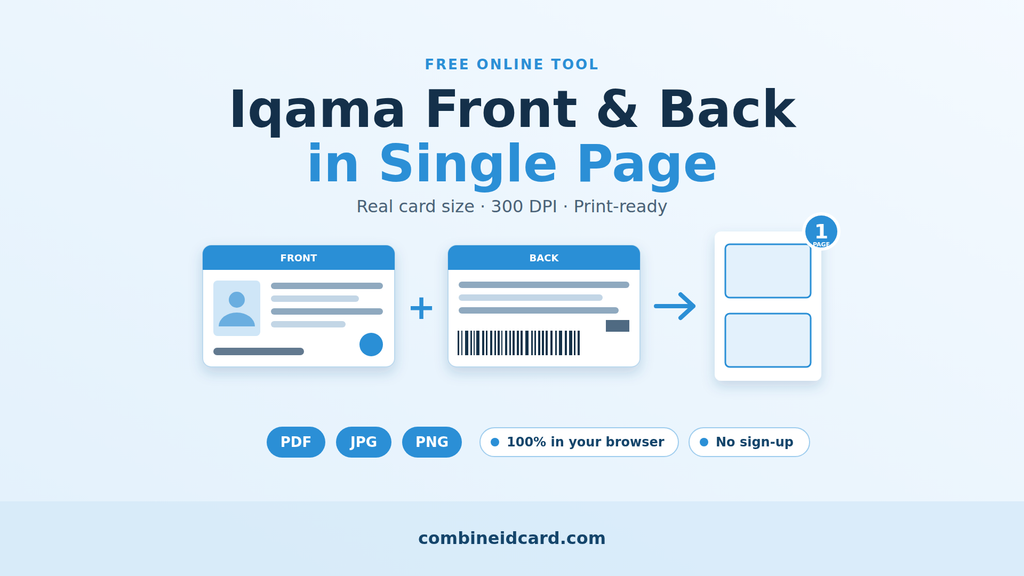
Managing identity documents for different applications can involve more than just keeping a copy of your card. You may need to adjust image dimensions, reduce file size, or prepare both sides of a document in a convenient format. Combine Iqama Card Front and Back online to keep both sides of your Saudi residence ID together in one clear layout, ready for printing, document submission, or personal records.
With an online resident document toolkit, you can find useful options for common image and document needs in one place. If you need to resize, watermark, or convert a GCC resident ID image online, choose the relevant tool and check the final file before saving or sharing it. Always follow the receiving organization’s requirements and handle personal documents carefully.
What Does It Mean to Combine Iqama Card Front and Back Online?
What does it mean to combine both sides of a Saudi residence card? Merge both sides of a Saudi Iqama on one page means arranging the front and back images of your Iqama in one file so both sides are easier to view, print, and store together. Instead of keeping two separate pictures, you can prepare a single, organized copy for your records or a document request.
A Saudi Iqama card merger helps arrange existing images without changing the information printed on the card. If you want to Combine Iqama Card Front and Back, start with clear pictures of each side and check the finished layout before saving it. The result is an image arrangement, not a replacement for your original residence document.
About This Iqama Card Combining Tool
This page provides guidance on using merge Iqama Card Front and Back to arrange the two sides of a Saudi residence card in one file. An online Iqama card merger is intended to help organize existing images; it does not issue, renew, authenticate, or modify an official residence permit.
If you need to combine both sides of an Iqama card for an application, check the relevant organization’s instructions before submitting the result. Acceptance requirements may differ between employers, service providers, and government platforms. This tool is independent and is not affiliated with or endorsed by Saudi government authorities. For official residence permit information, use the appropriate government service or contact the organization handling your request.
How to Combine Iqama Card Front and Back Online?
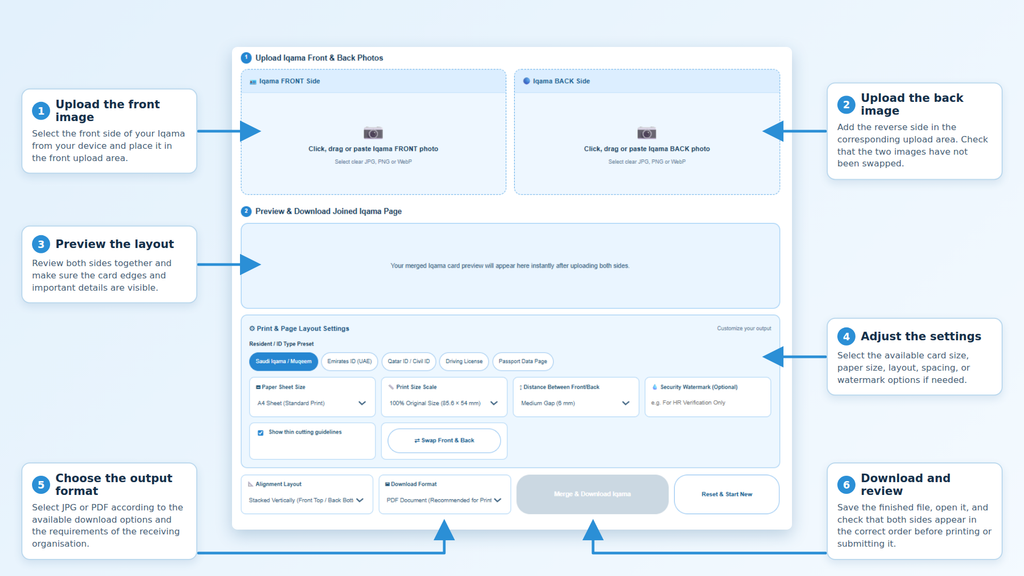
Preparing both sides of your residence card is straightforward when you have clear images ready. Use Combine Iqama Card Front and Back to arrange the two sides in a convenient layout and review the result before downloading. An Iqama front and back image combiner can help you keep the images together instead of managing separate files.
Follow these steps to merge the front and back of an Iqama card online:
- Upload both images: Select clear pictures of the front and back of your Saudi Iqama
- Choose the layout: Select a vertical or horizontal arrangement if the tool provides both options
- Adjust the spacing: Keep enough room between the two sides without making the final image unnecessarily large
- Check the preview: Make sure the card details, photograph, and printed text remain visible
- Choose an output format: Select an available format, such as JPG, PNG, or PDF, according to your needs
- Download the result: Save the combined file and open it once to check that both sides appear correctly
Recommended Settings for an Iqama Card
The right settings depend on how you plan to use your combined document. When you Combine Iqama Card Front and Back, choose a layout that keeps both sides readable and follows the recipient’s requirements. A Saudi Iqama image merger may offer different layout or export options depending on its features.
| Setting | Available options to consider | Recommended approach |
|---|---|---|
| Page size | A4, Letter, or another supported size | Use the size requested by the receiving organization. |
| Print scale | Actual size or a custom scale, if available | Avoid unnecessary resizing when card dimensions matter. |
| Space between sides | Narrow, medium, or wide spacing, if supported | Leave enough room to distinguish the front from the back. |
| Alignment | Vertical or horizontal, if supported | Choose the arrangement that makes both sides easy to read. |
| Cutting guides | On or off, if available | Use guides only if they help with your printing needs. |
| Watermark | Custom text, if supported | Add a purpose label only when appropriate and accepted. |
| Output format | JPG, PNG, or PDF, depending on available options | Match the file format to the recipient’s requirements. |
To prepare a Saudi Iqama front and back for printing, review the settings before exporting and the options shown in the table are general considerations; the actual choices depend on the features available in the tool.
Print Your Combined Iqama at the Right Size
A combined image may look correct on screen but print differently depending on the page size and scaling settings. When you merge Iqama Card Front and Back for printing, check the print preview before using paper. An Iqama card printing layout should keep both sides clear and proportionate rather than stretching them to fill the page.
To print a combined Iqama card image at the intended size, follow these checks:
- Open the downloaded file and confirm that both sides are visible
- Select the paper size requested by the recipient or required for your purpose
- Review the print scale and avoid automatic fitting if it changes the required dimensions
- Check the preview for cropped edges, blurry text, or unwanted blank areas
- Print a test copy if the dimensions are important
Photograph Your Iqama Clearly Before Combining
The quality of the final file depends partly on the images you upload. When you Combine Iqama Card Front and Back, clear source pictures make it easier to read the printed details and check that both sides are represented correctly. An Iqama image quality checker is useful as a general way to think about image clarity, although the actual tool may not include a separate checking feature.
For a clearer result, prepare readable front and back images of your Saudi Iqama before uploading:
- Place the card on a plain, contrasting surface
- Use even lighting to reduce glare and harsh shadows
- Keep the camera directly above the card rather than shooting at an angle
- Make sure the text and photograph are in focus
- Keep the full card inside the frame, including all corners
- Take both pictures in similar lighting so the sides look consistent
How to Keep Your Combined Iqama Card Front and Back Safe
An Iqama contains personal information, so it is worth thinking carefully about where you upload, store, and share its images. When you Combine Iqama Card Front and Back, use the resulting file only for a legitimate purpose and avoid sharing it more widely than necessary. A secure Iqama document copy should be handled with the same care as the original images.
To share a combined Iqama image responsibly, keep these practices in mind:
- Submit the document through an official or otherwise trusted channel
- Confirm that the recipient genuinely needs a copy of your Iqama
- Avoid posting clear images of your residence card on public websites or social media
- Check the tool’s privacy information before uploading sensitive documents
- Remove downloaded copies from shared devices when you no longer need them
- Use a watermark only when appropriate, and check whether the recipient accepts marked copies
Common Problems When You Combine Iqama Card Front and Back
Sometimes the combined file does not look the way you expected. When you Combine Iqama Card Front and Back, checking the original images and output settings can help you identify common problems. An Iqama image merging tool can arrange the files, but it cannot recover details that are missing from a poor-quality original.
| Problem | Possible reason | What to try |
|---|---|---|
| One side looks smaller than the other | The original images have different dimensions | Use images with similar framing or adjust the layout if supported. |
| Card details appear blurry | The source image is low quality | Upload a clearer photograph or image. |
| Part of the card is missing | The original picture was cropped | Take another picture showing all card edges. |
| The file is too large | The images have high resolution or use a large file format | Use a suitable compression option if available. |
| The file will not open | The download may be incomplete or the format may be unsupported | Download again and open it with a compatible application. |
| The receiving website rejects the file | The format, size, or layout may not meet its requirements | Check the submission instructions and export an accepted format. |
| The printed result looks different | Print scaling or paper settings may have changed the layout | Review the print preview and scaling options. |
Prepare your Iqama copy carefully: check both sides, confirm the required format, and make sure the finished file meets the recipient’s instructions before sharing or printing it.
Frequently Asked Questions
Can I combine Iqama Card front and back into one image?
Yes, the tool supports both image uploads and provides a combined output. Combine Iqama Card Front and Back to arrange the two sides together, then preview the result to check that all important details are visible. The available layout and download formats depend on the tool’s features.
How do I combine Saudi Iqama Card front and Back on one page?
Upload clear images of the front and back, select a suitable layout if the option is available, and check the preview before downloading. A combine Iqama card front and back merger can help organize the two images, but the final page size should match the receiving organization’s instructions.
Can I download the combined Iqama as a JPG or PDF?
Yes, JPG and PDF are both available, select the format required for your intended use. Before you download a combined Iqama card file, check the file size and make sure the saved document opens correctly.
Do I need to print both sides separately after combining them?
Not necessarily, If the combined layout places both sides on one page, you may be able to print them together. Check the preview and follow the recipient’s instructions, especially if the card must meet a specific physical size or page layout.
Will Iqama images change the original card details?
Combining images should arrange the existing pictures rather than change the official information on the card. A Saudi residence ID image combiner does not verify or update your residence permit. Always check the final image to ensure that the source details remain readable and unaltered.
How can I make combine Iqama card front and back image clearer?
Start with sharp, well-lit pictures that show the full card without glare or cropping. Review the output at full size after combining the images. A clear Iqama front and back image is easier to read, but combining cannot restore details that were already blurry or missing from the original.
Can I Use a Combined Iqama Card Front and Back for Official Submission?
Before you Combine Iqama Card Front and Back, check whether the recipient accepts combined images and follow its required format.
Is It Safe to Upload Iqama Images When You Combine Iqama Card Front and Back Online?
Before you Combine Iqama Card Front and Back, choose a trustworthy tool and review its privacy policy. Upload your Iqama only when necessary, and avoid sharing the images publicly.