
Merge Voter Card Front and Back Online on One Page
अपने Voter ID कार्ड की दोनों तरफ़ की तस्वीरों को आसानी से एक ही पेज पर व्यवस्थित करें। डाउनलोड करने से पहले प्रीव्यू देखें और फ़ाइल को JPG, PNG या PDF में सेव करें।
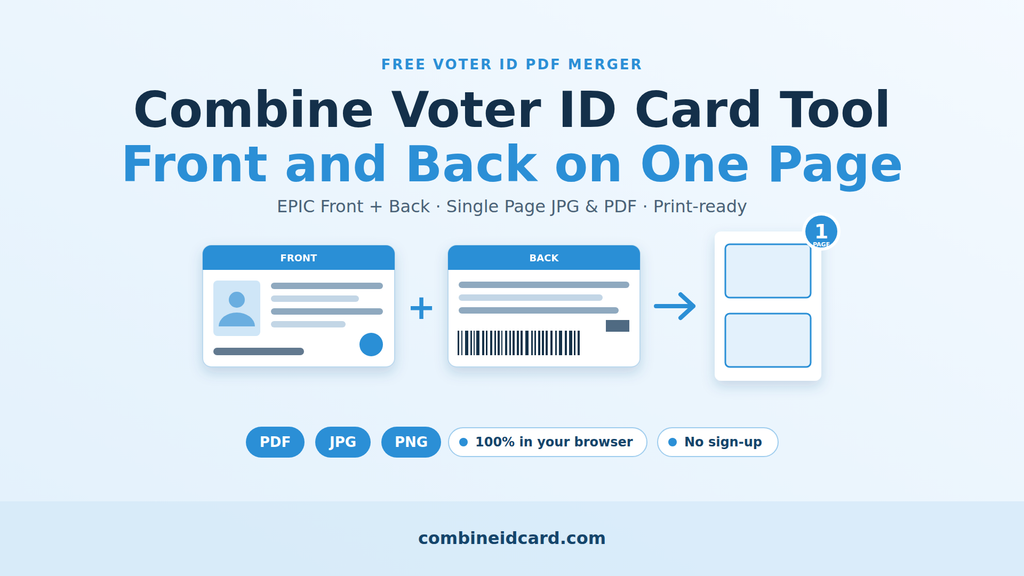
Need both sides of your Voter ID in one place? Merge Voter Card Front and Back makes it easy to bring the front and back images together in a neat, easy-to-view layout. Upload your pictures, adjust their position if needed, and check the preview before downloading the finished file.
Whether you’re preparing a copy for personal records, printing, or an application that accepts a combined image, a Voter ID card image merger can save you the trouble of handling two separate files. You can combine Voter ID images on one page and download the result in JPG, PNG, or PDF format for convenient storage or sharing.
Looking for more useful document tools? combine Voter Card Front and Back is one way to keep your identity documents organized, while other online utilities can help with everyday document preparation. Whether you need to arrange card images, prepare files for printing, or convert documents into a suitable format, choosing the right tool can save time and effort.
You can explore more options on our homepage, including tools for different identity cards and document formats. A merge Voter card front and back document tool can help with specific voter card tasks, while an online ID card utility may be useful for other document needs. Always review your files before downloading or sharing them, and use trusted tools when handling personal information.
How to Merge Voter ID Card Front and Back Online?
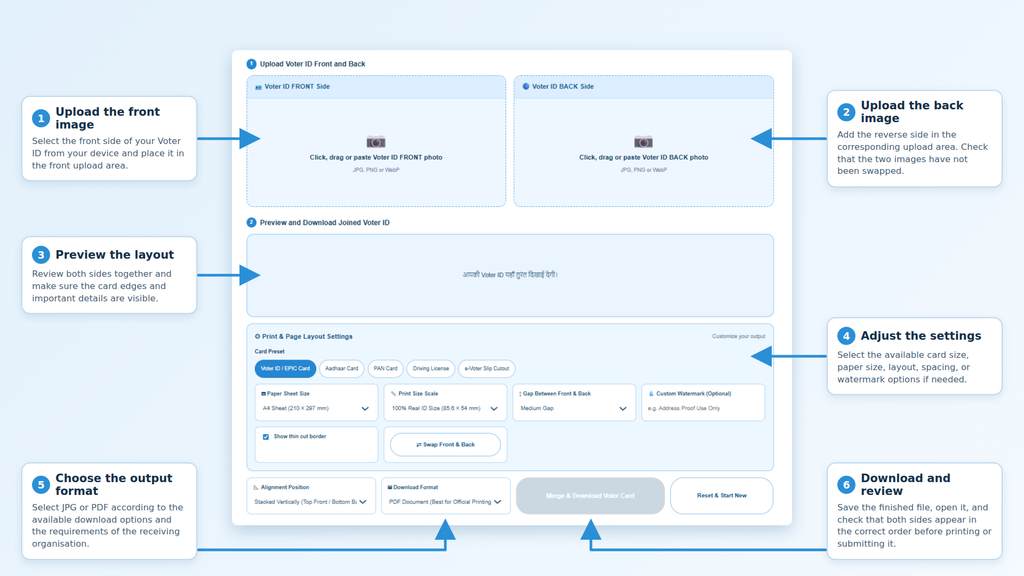
You can put Voter Card Front and Back in a few simple steps:
- Upload the front image: Choose a clear picture of the front of your Voter ID card
- Upload the back image: Add a picture of the reverse side
- Adjust the layout: Position both images neatly using the available settings
- Preview the result: Make sure all card details are readable and neither side is cropped
- Download your file: Save the combined image as JPG, PNG, or PDF
This Voter ID card merger helps you combine Voter ID card front and back on one page for convenient printing or record keeping. Check the downloaded file before sharing or submitting it.
Tips for Clear Voter ID Images Before Merging
Before you Merge Voter Card Front and Back, take a moment to check the condition of both images. Old, faded, or poorly photographed cards can produce an unclear combined copy, even when the layout looks correct.
If you want to combine Voter ID card front and back without losing readability, these simple tips can help:
- Photograph the card in natural daylight or under even lighting
- Place it on a plain, flat surface with all four edges visible
- Keep your phone directly above the card to avoid a slanted image
- Avoid strong filters that may hide small printed details
- If the text looks too dark or faded, adjust brightness carefully without changing the card information
- Capture the reverse side clearly, including any printed details that may be needed
- Check both images before using the Voter ID image merger
Protect Your Voter ID Copy After Downloading
Your Voter ID contains personal information, so it is worth thinking about where the finished copy will be stored and who will receive it. When you Merge Voter Card Front and Back, prepare a copy only for a genuine purpose and avoid sharing it more widely than necessary.
If you need to share a combined Voter ID card copy securely, follow these precautions:
- Use a purpose-specific watermark: When appropriate, add a short note explaining the intended use, such as “For address verification only.” Do not cover important details
- Include a date if useful: A date can help identify the purpose of a printed copy
- Share it with the right recipient: Prefer a verified official portal or trusted recipient over an unknown contact
- Keep the original safe: Retain your original card and avoid unnecessary copies
- Clear shared devices: Remove downloaded files from public or shared computers after use
- Avoid public posting: Never upload an unredacted card image to public social media groups
A Voter ID document copy should be shared according to the receiving organization’s requirements. If the recipient does not need both sides or all the visible details, ask what information is actually required.
What Does It Mean to Merge a Voter Card?
Combining both sides of your Indian Voter ID into one file makes the card easier to view, print, and keep for future reference. Merge Voter Card Front and Back to arrange the front and back images in a single layout, check their alignment, and prepare a clear copy for your records or a specific application. Keeping both sides together can also make it more convenient to organize your document files when you need to access them later.
A Voter ID card merger helps you arrange your existing images without changing the official details on your card. With a Voter ID image combiner, you can bring both sides together and review the final result before saving it. If you need to combine both sides of a Voter ID on one page, use clear images and choose a suitable output format, such as JPG, PNG, or PDF, based on the recipient’s requirements. Always check that important details remain readable before printing or sharing the file.
Is It Safe to Merge Voter Card Front and Back Online?
Online tools can make document preparation convenient, but privacy depends on how the particular website processes uploaded files. Before you merge Voter Card Front and Back, check the site’s privacy policy and understand whether images are processed locally in your browser or sent to a server.
If your goal is to merge Voter ID front and back images privately online, look for a tool that clearly explains its file-handling practices. Browser-based processing can reduce the need to upload images, but only if the tool genuinely performs the operation locally. Avoid using sensitive documents on devices or networks you do not trust.
This is an independent image utility, not an official Election Commission of India service. It cannot register voters, verify EPIC details, or update official voter records. For official voter services, use the Election Commission of India’s authorized website.
Voter ID to JPG, PNG, or PDF: Choosing the Right Format
After you Merge Voter Card Front and Back, the best download format depends on where you plan to use the finished file. Different websites and organizations may have different requirements for image types, dimensions, and file size. If you need to save your Voter ID front and back on one page as JPG, PNG, or PDF, consider these differences:
| Format | Best suited for | What to check |
|---|---|---|
| JPG | Forms that request a standard image file | Image quality and file size |
| PNG | Situations where a PNG image is accepted | File size and readability |
| Printing or keeping both sides in one document | Page layout and recipient requirements |
A Voter ID file converter can help prepare a file in the required format, but converting an image does not automatically make it acceptable for every application. Check the instructions before uploading or printing your combined copy.
Common Problems When You Merge Voter Card Front and Back
Sometimes the finished result does not look the way you expected. When you Merge Voter Card Front and Back, check the original images, layout settings, and downloaded file before trying again.
If you need to fix a combined Voter ID image that looks incorrect, use the following guide:
| Problem | Possible reason | What to try |
|---|---|---|
| Card edges are missing | The original photo is cropped | Take another photo with all edges visible |
| Text looks blurry | The source image is unclear | Use a sharper, well-lit image |
| One side appears too small | The images have different dimensions | Adjust the size using the available settings |
| Front and back appear in the wrong order | The images were selected incorrectly | Check the preview and switch their positions if supported |
| Download does not open | The file may not have saved correctly | Download again and check the file type |
| File is too large | The image dimensions or quality settings are high | Use suitable compression if available |
A Voter ID image joining tool can arrange the pictures, but the final quality still depends on the source files and the settings provided. Always open the downloaded copy to confirm that both sides are visible and readable.
Prepare Your Voter ID Copy for Printing or Storage
A clear combined image makes it easier to keep both sides of your voter card together for personal records, document submission, or printing. Use Merge Voter Card Front and Back to arrange the front and back images in one layout, adjust their placement, and review the result before downloading. Whether you need a single image for reference or a neatly arranged document for a specific application, preparing both sides together can make the process more convenient.
Before sharing the finished file, check that both sides are readable and that the recipient accepts your chosen format. A Voter ID card image merger can help you prepare a more organized copy, while a Voter ID front and back image combiner makes it easier to keep both sides together when handling your files.
Frequently Asked Questions
How do I merge Voter Card front and back online?
It is too easy to merge voter card front and back online – upload clear images of the front and back, arrange them using the available settings, check the preview, and download the finished file in a supported format.
Can I put both sides of an Indian Voter ID on one page?
Yes, the tool supports a combined layout, check that both sides are fully visible and that the printed details remain readable.
Can I download my combined Voter ID as JPG, PNG, or PDF?
This tool offers JPG, PNG, and PDF formats and choose the option accepted by the person or organization receiving your file.
Will merging my Voter ID change my official voter details?
No, The tool is designed to merge voter card front and back images, not to change official records and for registration, corrections, or other voter services, use the authorized Election Commission of India portal.
Can I use a combined Voter ID image for every application?
Not necessarily, Some organizations require separate images or have specific rules about file formats and document submission. Follow the recipient’s instructions before sending your copy.
What should I do if my merge Voter Card front and back image is faded or blurry?
Take a new photograph with better lighting and keep the card flat and Image merging cannot restore information that is missing or unreadable in the original.